A skill is built in conversation, not in a handbook
An employee practises against an AI customer with a personality and gets a review right after every line.
How the training works
The trainer covers the whole path of an employee — from the plan to certification. Every step is visible to the manager.
Plan
A course is built from scenarios: onboarding, a new product, objections. A scenario can be generated from a description of the task.
Practice
The AI customer interrupts, gets angry and changes its mind — just like on the line. Attempts are unlimited.
Review
After every line you see what came out wrong and which phrase to choose instead.
Exam
A graded dialogue scored against a checklist. The result is recorded; retakes and appeals follow the rules you set.
Certification
The employee is cleared for live calls or sent back for more practice. The decision rests on a recording and a score, not on an impression.
Report
The manager sees progress for each person and for the group: who has grown, who is stuck, which skills are weak across the whole shift.
Scenarios are built from your own recordings: Speech Analytics finds the calls that went wrong, and the trainer turns them into an assignment.
Knowledge ≠ skill
Why employees fail with real customers even after passing the script test.
The test is passed, the skill is not there
The employee knows the script by heart — and freezes when the customer interrupts, gets angry or switches to Uzbek.
The mentor has no time
There is not enough time or attention for every newcomer, and the first mistakes land on live customers.
A script is static
Script training is memorising. The trainer is a live dialogue in which the AI customer adapts to the employee’s answers.

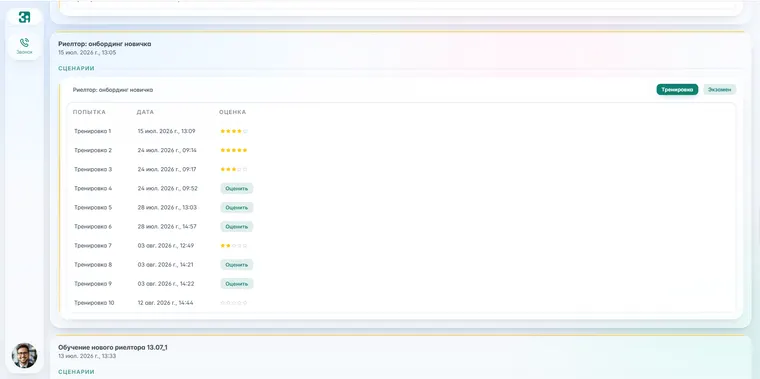
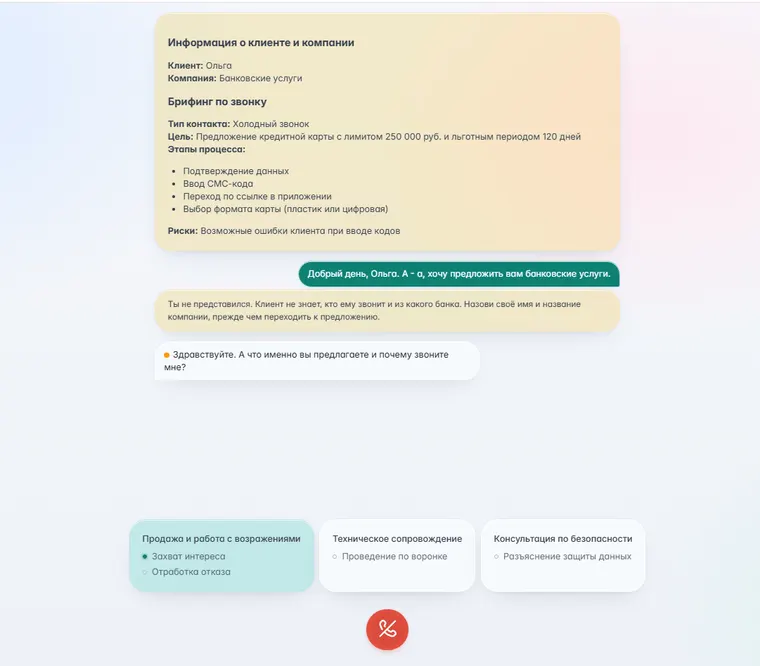
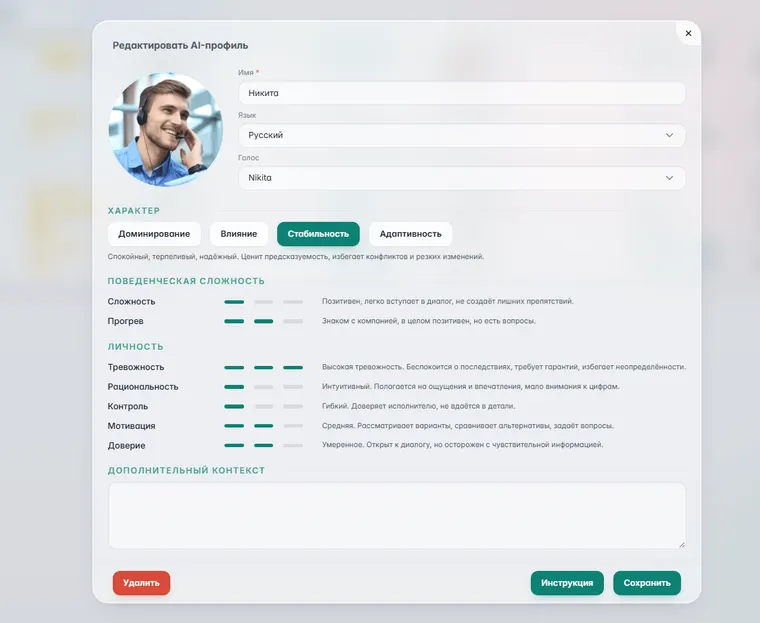
How it looks
The employee opens their account, picks the assigned scenario and talks to the AI customer. The trainer builds scenarios and reads the review.
A dialogue with the AI customer
- Live conversation in real time: the customer interrupts, doubts, gets angry
- By voice or in chat — in Uzbek, Russian and the two mixed
- Hints, nudges or direct advice during the call — prompter mode
- The behaviour, voice and emotional tone of the AI customer are tuned to the case
- A detailed review at the end: lines, emotion, the structure of the conversation
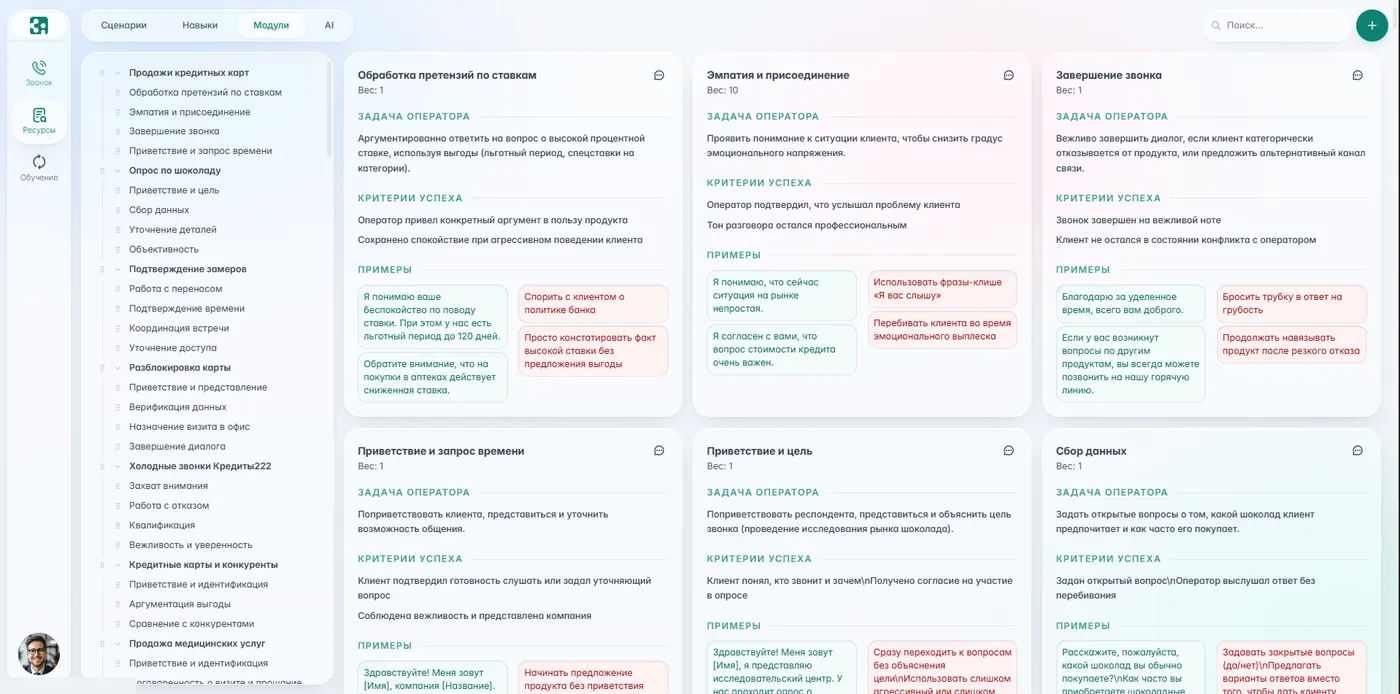
How a practice run is assembled
A module is one skill: the task, model phrases, the signs of failure. Scenarios are assembled from modules.
- A module is the agent’s task, the success criteria and examples: how to do it and how not to
- A skill is assembled from modules and sets the state the customer is in
- A scenario is a set of skills: it is assigned to an employee or to a group

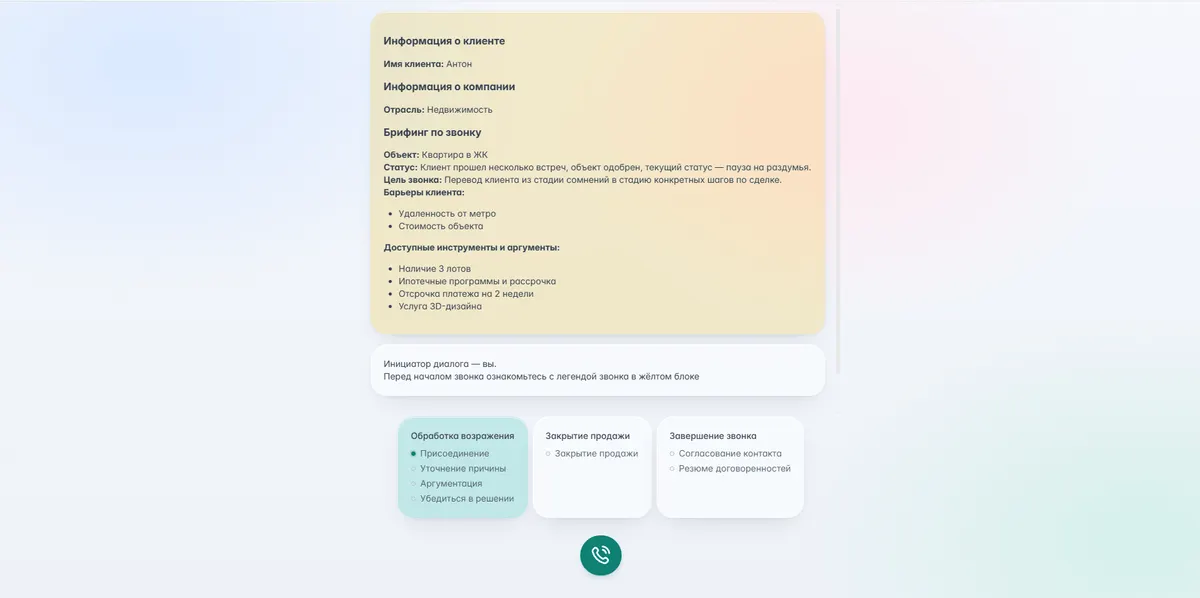
How the practice itself runs
The employee talks to the AI customer while the system listens. It can prompt along the way, and right after each line it shows what worked and what did not.
Roles in the system
Every employee has an account with an assigned role and its own set of features.
Administrator
User management, general settings, integrations.
Trainer
Creating and editing scenarios, assigning tasks, going through mistakes, reviewing results.
Observer
Viewing and exporting reports without access to scenario settings.
Learner
Practice, exams, points, their own progress, retake requests and appeals.
This is a product, not a bot with a prompt
What changes in numbers
Sales
Service and support
HR, logistics, operations
- Mentors spend ten times less time on onboarding
- Employees reach target results sooner
- Scaling up without spending more on trainers
How the trainer works in different industries
Eight rollouts across different industries, from contact centres to retail.
Long onboarding for agents, stress in conversations with customers who object, and a low rate of cross-sales on credit products.
What we did- We built sales scenarios for credit cards and cash loans in the no-code editor.
- We connected Speech Analytics: the trainer taught on real recordings of the bank’s successful and failed calls.
- The AI customer played scepticism: “I have already paid a fee”, “I need to think about it”.
Agent onboarding: from a week to 3 days
Sales of credit products +7 %
Newcomers hit target 2.3 times faster
Policy terms are hard to explain, and staff burn out on claims handling — customers call under stress after a road accident.
What we did- The trainer, adapting voice and emotion, played confused and furious policyholders.
- Employees learned to hold a live conversation, show empathy and collect the documents for a payout.
- Feedback on every line corrected tone and terminology on the spot.
NPS more than doubled
Dialogue quality score +13 % in a month
Repeat contacts about one case −22 %
High subscriber churn; the contact centre had to be trained at scale on retention and on selling new plans.
What we did- Scenarios “The customer wants to cancel” and “Moving to a more expensive plan with a new router”.
- The trainer is open 24/7 — night shifts and remote staff practised without supervisors.
Add-on sales of services and plans +4–7 %
Call time −6.4 %
Errors in connection orders −55 %
Long deal cycles, lead qualification, and work with cold and warm lists where customers hesitate.
What we did- Dialogues with investors and private buyers: awkward questions about mortgages, legal title and infrastructure.
- Practice in booking meetings and viewings against tough competition.
Successful calls that ended in a booked meeting +25 %
Mentors and sales managers spend ten times less time on onboarding
A huge flow of support contacts, delivery and returns, and a need to lift the average basket with related products.
What we did- Scenarios “Where is my order?” and “The item arrived damaged” with every type of customer, from calm to aggressive.
- Integration with CRM and LMS: an employee was automatically assigned the scenario they had got wrong in real chats and calls.
FCR rose from 68 % to 84 %
Support certification time −70 %
Court and pre-court claims −35 %
Falling conversion at the tills and on the floor, staff not offering related products, and a need to standardise service.
What we did- Voice dialogues with the AI to practise hook phrases: “There is a promotion on this collection right now…”.
- The AI customer interrupted and got distracted, training the salesperson’s composure and attention.
Average basket +8 % from add-on sales
Successful conversations with customers +25 %
High courier turnover, training on communication standards at handover, conflicts with recipients and mistakes with returns.
What we did- A mobile format: text and voice scenarios on the courier’s phone.
- Scenarios “The customer is not picking up”, “The customer refuses the parcel”, “The packaging is damaged”.
Repeat trips −40 %
Delivery quality score (CSI) from 4.1 to 4.7 out of 5
Receptionists lose patients because they cannot offer a full package of services, and they face complaints about queues and booking.
What we did- Scenarios for booking with specialists and offering preventive programmes.
- The AI customer played anxious patients demanding to be seen out of turn.
Fewer conflicts and fewer entries in the complaints book
Service standards rolled out to new branches without spending more on trainers
What the system is made of
Voice and text
A dialogue with the AI customer by voice or in chat. Our own speech recognition and synthesis for Uzbek and Russian.
Scenario editor
A visual no-code editor: multi-step scenarios with branches and roles. A draft scenario is generated from a description of the task in one click.
The AI customer’s character
Behaviour, voice and emotion are configurable: patient or irritated, calm or under stress.
Immediate feedback
After every line and at the end of the dialogue — a review of the lines, the emotion and the structure of the conversation.
Scenarios from your own calls
Speech Analytics finds the calls that went wrong and the trainer turns them into scenarios — the same customer, the same objection.
Analytics and certification
Reports by employee and by group, progress over time, weak spots, exams and appeals.
Scale
Hundreds and thousands of employees practise at once, 24/7, with no trainer involved.
Integrations
CRM, HRM and LMS over API; embedding into an LMS after a SCORM course; a link to Speech Analytics.
Who it suits
How the launch goes
We help you pick the scenario, set up the logic, connect your systems and start the pilot.
- We pick the scenario — We go through the task, the audience and the result you expect.
- We set up the dialogue — Roles, limits, the knowledge base, the AI customer’s character, the scoring criteria.
- We connect your systems — CRM, HR platforms, LMS, script libraries, Speech Analytics.
- We launch and scale — A pilot, analysis, refinement, rollout to everyone.
A basic pilot scenario goes live in 2–3 days.
- SaaS or On-Premise inside your own network
- Encrypted data exchange
- Access control for scenarios and reports
- Action logging
- 24/7 support
Compliance with the personal data law of the Republic of Uzbekistan.
Still have questions?
How is the AI Trainer different from script training?
Script training is memorising and a static test. The trainer is a live dialogue: the AI customer adapts to the employee’s answers, asks follow-up questions, changes its emotional tone and behaves like a real customer. The skill is built in conversation, not in a test.
Can a scenario be created without programming?
Yes. In the visual editor you describe the structure of the dialogue, the AI’s lines, the employee’s answer options, the conditions for moving on and the scoring criteria. A draft scenario can be generated from a description of the task in one click and then refined.
Is a microphone needed?
For practice by voice, yes — the conversation runs as it does on the line. The same scenario can also be taken in text, in chat: that is a convenient way to start and how people practise in an open-plan office.
Which languages does the AI customer speak?
Uzbek, Russian and the two mixed inside one sentence — the way customers speak in Tashkent. The customer’s language and character are set in the scenario.
Where do the training results go?
Into the account — reports by employee and by group. Export to CRM, HRM, LMS, a corporate portal or email can be set up as well, and Telegram notifications can be connected.
Can it be deployed in a closed network?
Yes. For clients with strict security requirements there is an On-Premise installation on the company’s own servers or in a private cloud. The data never leaves your network.
How long does it take to launch the first scenario?
A basic pilot scenario takes 2–3 days: we help build the structure, load the starting data and tune the AI. With CRM integration or complex scoring it takes longer, but the first practice runs already happen on the pilot.
How much does it cost?
The price comes from the number and complexity of the scenarios, the number of employees, the licence model — a per-user subscription or a corporate licence — and the deployment format, cloud or On-Premise. Tell us which skill you want to build and how many people you need to train, and we will prepare a quote.
We will show the trainer on your own scenario
Tell us which skills you need to build. In an hour we will show what it does, propose a scenario and give you demo access.